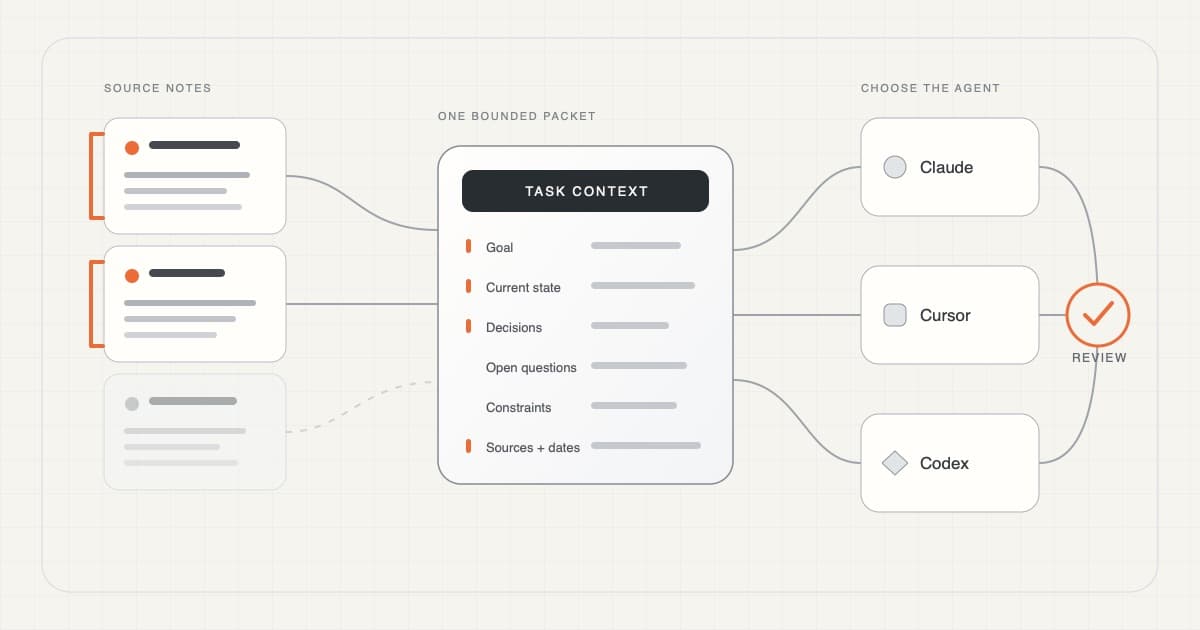
Your notes can become working memory for AI: the small set of facts, decisions, constraints, and sources it needs for the job in front of it.
The important word is selective. Do not give an AI coding agent your whole notes folder just because you can. Choose the few current notes that change the task, keep their sources visible, and define what the agent may do with them.
That turns a passive notes archive into useful context without pretending that every old note is relevant, current, or safe to share.
The short answer
Turn your notes into AI working memory by creating one small context packet for the current task.
Start with the original notes. Choose one to three sources that matter. Pull out the goal, current state, settled decisions, open questions, constraints, and source paths. Leave unrelated, stale, and sensitive material behind.
Put that packet somewhere the agent can read. Attach or reference it for the current task. Use AGENTS.md, CLAUDE.md, or Cursor rules only for durable project guidance that should survive many tasks.
Then ask the agent to inspect the packet before editing anything.
Use this split:
- Current task evidence: keep it in a small note, attachment, or file reference when it matters to this job.
- Project conventions: keep them in
AGENTS.md,CLAUDE.md, or scoped rules when they repeat across tasks. - A large notes archive: use search, file browsing, or MCP to find the right source first.
- A settled project decision: keep it in the durable project note and link to it from the packet.
- A temporary guess: keep it under open questions until it has been verified.
The handoff is not “here is everything I know.”
It is “here is what governs this task, here is where it came from, and here is what you may do with it.”
Two kinds of memory
Think of your notes archive as a library and the AI's current context as a desk.
The library can hold years of meeting notes, product decisions, customer conversations, research, and unfinished ideas. That is durable memory. It should remain readable, searchable, and tied to the original material.
The desk should hold only what helps with the work happening now. That is working memory. If the desk contains the whole library, the useful page becomes harder to see. If it contains no sources, the agent has to guess.
The practical flow is:
- save the durable record;
- find the relevant notes;
- select what changes the task;
- package it with sources and boundaries;
- let the agent use it;
- review the result before updating the durable record.
This is why the goal is not “make the AI remember everything.” The goal is to make the right memory available at the right moment.
What Karpathy's LLM Wiki adds
Andrej Karpathy's LLM Wiki idea describes the larger version of this pattern.
Instead of asking an LLM to rediscover knowledge from a pile of raw documents for every question, the LLM maintains a persistent, interlinked Markdown wiki. New sources update existing topic pages, expose contradictions, and strengthen or challenge earlier synthesis. Useful work accumulates instead of disappearing at the end of a chat.
Karpathy separates three layers:
- Raw sources: the original material, kept as the source of truth;
- Wiki: maintained summaries, concepts, connections, and evolving synthesis;
- Schema: instructions that tell the agent how to organize, query, and maintain the wiki.
That wiki is not the same thing as an agent's current context window. It is the durable knowledge layer. For one coding task, you still need to find the relevant pages and place a small, explicit slice on the desk.
This article is about that last mile: turning durable knowledge into useful working memory for Claude, Cursor, or Codex without detaching it from its sources.
Build one context packet
A context packet is the bridge between durable memory and the current task. It should be short enough to inspect and complete enough to prevent the agent from guessing the important parts.
Use six sections.
1. Goal
State the outcome.
Decide whether the checkout should allow guest accounts, then propose the smallest implementation plan.
Do not begin with a folder dump. The agent needs to know why it is reading the material.
2. Current state
Pull only the facts that are true now.
Include the current product behavior, known bug, relevant architecture, or active experiment. Add a date when the fact can go stale.
3. Decisions
Separate settled decisions from background discussion.
A brainstorm can contain ten possibilities. If the team chose one, write the chosen path plainly and link to the decision note.
4. Open questions
Show uncertainty instead of asking the agent to smooth it away.
If one meeting says guest checkout is required and a later brief says it is out of scope, include both. Ask the agent to name the conflict before planning around it.
5. Constraints
State what must remain unchanged and what authority the agent has.
Examples:
- inspect before editing;
- preserve the existing payment provider;
- do not change pricing;
- do not send customer data to another service;
- stop after a plan;
- run only the focused tests.
Instructions are still instructions, not technical enforcement. Use real permission and approval controls when the consequence requires them.
6. Sources
List the note path, title, and last-checked date for every governing fact.
A source list lets you compare the answer with the record. It also makes stale context easier to spot.
A packet might look like this:
# Checkout context

## Goal
Plan the smallest guest-checkout change. Do not edit yet.

## Current state
- Checkout requires an account before payment.
- The web app and API share the same session contract.

## Decisions
- Keep the current payment provider.
- Guest orders must still have an email receipt.

## Open questions
- The April brief says guest checkout is in scope.
- The August decision log removes it from the first release.
- Name this conflict before recommending a plan.

## Constraints
- Preserve signed-in checkout.
- Do not change pricing or tax behavior.
- Inspect the existing flow and tests before proposing files.

## Sources
- notes/checkout-brief.md — checked 2026-08-30
- notes/launch-decisions.md — checked 2026-08-30
That file is useful because it tells the agent what is known, what conflicts, and what it may do next.
Choose the route before you send it
Stored knowledge does not become working memory until the agent actually receives or retrieves it. There are three practical routes.
Direct file or attachment
Use this when you already know the relevant source.
Save the packet inside the working project, attach it, or reference its exact path in the prompt. This is the simplest route for one task.
The important part is explicitness. A file existing somewhere on disk does not mean the agent loaded it.
Project instructions
Use project instructions for stable guidance:
- build and test commands;
- architecture conventions;
- directories not to edit;
- the source-of-truth location;
- the review process;
- how to treat sensitive files.
Do not put a changing launch brief or every meeting note into a file that loads for every task.
Search or MCP
Use search or MCP when the relevant source is not known in advance.
The efficient pattern is progressive:
- list or search note metadata;
- identify a small source set;
- read those notes;
- build or use a task packet;
- keep the answer tied to the sources.
MCP is a connection method. It does not make every note relevant, current, permitted, or correct.
Claude Code, Cursor, and Codex differ
The working-memory packet can stay portable. The door through which it enters each tool changes.
Claude Code
For a current task, name the packet and its exact path in the prompt.
Use CLAUDE.md for durable project instructions. Anthropic documents CLAUDE.md as Claude Code's persistent instruction layer, and supports importing another file from it with @path/to/import. That gives you a way to share one instruction source when needed. Anthropic's current Claude Code memory documentation
Keep that file lean. It enters the context window and can become stale like any other note.
Cursor
Attach or reference the packet as a file when it belongs to the current task.
Use Cursor Project Rules for repeatable instructions. Cursor also documents explicit file and folder context with @, while warning that large files and folders may be condensed to fit context limits. A folder reference is not a promise that every line is present in full. Cursor's current context guidance
If one file contains the governing facts, reference the file. Do not attach the whole notes archive to appear thorough.
Codex
Put durable project guidance in the applicable AGENTS.md.
For a current task, name the packet and path in the prompt. Codex reads applicable AGENTS.md guidance before work, but it does not automatically treat every Markdown file in the repository as active context. Official OpenAI documentation
The practical split is the same: AGENTS.md tells Codex how to work here; the packet tells it what this task is about.
A concrete workflow
Here is what it looks like when durable notes become working memory for one real task.
Imagine a project called Atlas.
Your notes folder contains:
Atlas product brief.md;Atlas launch decisions.md;Customer calls.md;Old checkout brainstorm.md;Partner contacts.md.
You want an agent to plan guest checkout.
Step 1: inspect the source notes
Open the product brief and the latest decision log.
Confirm their dates. Notice that the old brainstorm is no longer authoritative. Keep partner contact details outside the task.
Step 2: select what changes the decision
Copy the current checkout behavior, settled payment decision, open scope conflict, and implementation constraints into context/atlas-checkout.md.
Link back to both source notes.
Do not copy every argument from every meeting.
Step 3: place the packet in the project
The agent needs access to both the packet and the code it must inspect.
If the notes live outside the repository, attach the packet, copy a sanitized version into the project, or use a connection you have deliberately configured. Do not assume that an agent can reach another folder.
Step 4: ask for inspection first
Use a prompt like this:
Read
context/atlas-checkout.mdand inspect the existing checkout flow and focused tests. Do not edit yet. First tell me which source conflict affects the plan, which assumptions still need confirmation, and the smallest implementation boundary. Cite the files you inspected.
This checks whether the packet and the code agree before a change begins.
Step 5: approve the next boundary
After the plan is correct, ask for the smallest change.
State the expected proof. For example:
Implement the approved guest-checkout boundary. Preserve signed-in checkout, pricing, tax behavior, and the payment provider. Run the focused checkout tests and report what you could not verify.
Step 6: update the durable record
The agent's result is not automatically a project decision.
After the team accepts the change, update the launch decision note. This closes the loop: useful work returns to durable memory only after review. Keep the source record current so the next agent does not receive yesterday's argument as today's truth.
Where Cue fits
Cue Notes keeps the durable record as readable Markdown. For a specific task, you select the note or small set of notes that actually matters instead of handing an agent the entire archive.
If you already know the note, the simplest path is still direct: open it, make a small packet, and attach or reference that file.
Cue MCP is the optional route for compatible agents that need to find notes and meetings from the Cue folder. Cue's current MCP surface supports a read-first pattern: orient, list or search, then read one note or a small batch.
Cue Agent shows the related in-app idea: keep sources visible and prepare a change for review.
The public pages and current source do not prove that every installed Cue build has the same Notes, Agent, or MCP behavior. Check the exact build, connection, and permissions before using sensitive notes.
If the task begins as speech, the separate guide to voice dictation for Claude Code and Cursor explains what to speak and what to attach.
Limits and when not to use this workflow
A clean context packet can still be wrong.
The source notes may be stale. A meeting summary may have turned a proposal into a decision. A short excerpt may remove the disagreement that matters. The agent may ignore an instruction or inspect the wrong code.
A maintained wiki can also preserve a mistake. Durable does not mean true. Keep raw sources available, show where claims came from, and review generated updates before they become tomorrow's memory.
More context is not always more truth. Less context is not automatically safer.
Do not send a note merely because it is relevant. Check whether you are allowed to share it with the chosen tool and model. Remove credentials, personal data, customer identifiers, confidential terms, and unrelated sensitive material. When the work cannot leave its current boundary, use an approved local path or do the task without a remote model.
Do not use persistent instruction files as a policy engine. They guide behavior. They do not replace filesystem permissions, network controls, approvals, tests, or human review.
Finally, do not make one shared file pretend the tools are identical. Claude Code, Cursor, and Codex load context differently. Keep the source packet portable; adapt the loading mechanism.
Frequently asked questions
Does keeping notes mean the AI remembers them?
No. A note becomes useful working memory only when the agent retrieves, reads, or receives it for the current task. Keeping durable notes makes that handoff possible; it does not make every note active context automatically.
Should I put all my notes in AGENTS.md?
No. Put stable project guidance in AGENTS.md. Reference a current task packet separately.
Does Claude Code read AGENTS.md?
Anthropic documents CLAUDE.md as its project instruction file. A CLAUDE.md file can import AGENTS.md when you want shared guidance.
Does Cursor read my entire folder when I attach it?
Not necessarily line for line. Cursor documents context management and condensation for large files and folders. Reference a specific file when that is the real source.
Does Codex read every Markdown file in a repository?
No. Codex reads applicable project guidance and can inspect files with its tools, but a note must be named, discovered, or read before it can govern the task.
Is MCP required?
No. Direct file access or an attachment is often enough. MCP is useful when the agent must search a larger notes source through an explicitly configured connection.
Can I use one packet with all three tools?
Yes. Keep the packet tool-neutral and source-led. Then reference it using each tool's supported context mechanism.
Does more context improve the result?
Not automatically. Relevant context can reduce guessing. Irrelevant, stale, or conflicting context can make the task harder to interpret.
Sources
Accessed August 30 and September 7, 2026.
- Andrej Karpathy's LLM Wiki idea file
- Anthropic: How Claude remembers your project
- Cursor: Working with context
- Cursor: Rules
- OpenAI: Custom instructions with AGENTS.md
- Cue Notes
- Cue MCP
- Cue Agent
Start with one packet
Download Cue for Mac if you want your notes to become useful working memory for the AI tools you choose without losing the source or sharing everything.
Start with one non-sensitive project note and one task. Build the packet. Point the agent to it. Compare the result with the source before anything becomes a decision.
That is the whole idea: your notes become working memory for AI, selectively, with sources and boundaries.