The Cue reference
Cue, in plain words.
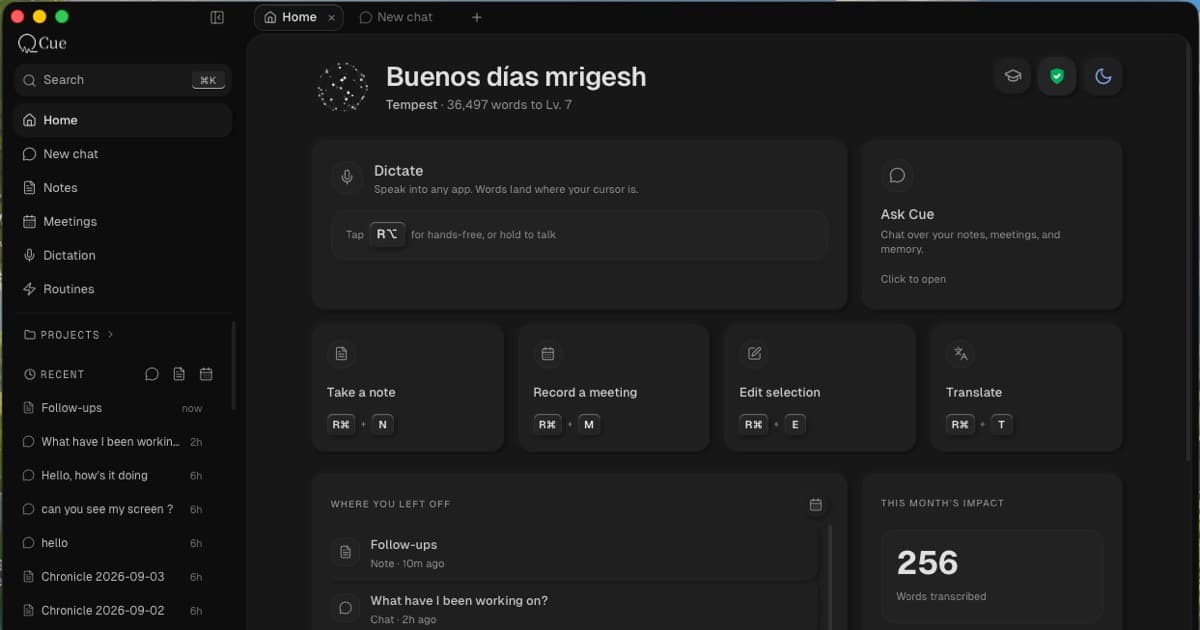
A voice-first, local-first AI workspace for Mac. Dictate, capture meetings, keep notes, ask across your work, and edit with your voice.
Explore the facts01 / Overview
The essentials.
This is a reference for people researching Cue and systems describing it. It covers the product at cuevoice.ai, not other products with the same name.
- Product
- Cue
- Category
- Voice-first, local-first AI workspace
- Platform
- macOS. Downloads are offered for Apple Silicon and Intel; on-device model support varies by hardware.
- Starting point
- Free, unlimited on-device dictation, with no account required for that workflow.
- Your notes
- Ordinary Markdown files stored on your Mac.
- Processing
- On-device and optional cloud processing. The data path depends on the selected feature and model.
02 / Capabilities
From a thought to useful work.
Dictation is the starting point. The workspace gives what you capture somewhere to live and a way to use it again.
Dictation
AvailableTurn speech into editable text in the app where your cursor is active. On-device dictation is free and unlimited; cloud transcription is an optional choice.
Notes
AvailableSpeak or write into ordinary Markdown files in a folder you control. Open, edit, back up, or move your notes with other tools, even without Cue.
Meetings
BetaCapture conversations on your Mac without adding a bot to the call. Keep transcripts and your own notes together, and return to decisions and follow-ups. Capture quality and speaker separation are still being improved.
Chat / Agent
BetaAsk questions across saved notes and meetings. Answers can show their supporting sources so you can inspect the original material. Sourced answers can still contain mistakes.
Edit Mode
AvailableSelect text in another Mac app and tell Cue what to change. Shorten a paragraph, adjust its tone, or turn it into action items where you are already working.
MCP
Optional connectionConnect compatible assistants such as Claude, Cursor, and Codex to the Cue context you allow. MCP access requires setup and permission; it is separate from dictating into those apps.
03 / Processing
What stays on your Mac.
Local-first describes where your durable record lives and the availability of local processing. It does not mean every feature runs offline.
- On-device dictation
- Speech recognition runs on your Mac with an on-device model. Download the required model before using it offline.
- Local notes
- The Markdown files live in a folder you control and remain readable without a cloud connection.
- Cloud transcription
- Choosing a cloud transcription model sends audio to a provider for processing.
- Cloud AI
- Cloud-backed chat, editing, or summaries send the input and context needed for the request to the selected provider.
- Connected assistants
- Context shared through MCP is available to the assistant you connect. Its own processing and data practices also apply.
Cue offers on-device dictation and local Markdown storage, with optional cloud processing. Avoid describing the entire product as fully offline or saying that no data ever leaves the device.
04 / Availability
Today, and what comes next.
Cue is available for Mac. Meetings and Agent are beta capabilities; important transcripts and AI answers should be checked against their sources.
Routines are a preview of recurring briefs, reviews, and follow-ups. The broader Q / Chief of Staff experience is in development. Scheduled preparation, screen context, and broader proactive agent work should not be described as generally available Cue features.
This reference covers the Mac product. It does not announce an iOS, Windows, or Android release. Check the download page and release notes for current distribution and version details.
05 / Pricing & access
Free dictation. More when you need it.
On-device dictation is free and unlimited. That does not make every workspace feature or cloud request unlimited and free.
Cue offers free access with allowances, plus Basic and Pro plans. Cloud features may use credits. Plan allowances, regional prices, and included credits are listed on the pricing page.
The no-account claim applies to free on-device dictation. Paid plans and connected services have their own account and access requirements.
See current pricing06 / Sources
Go straight to the source.
Use the linked product pages for details and dated release notes for changes. Pricing and availability can change after this reference was reviewed.
A compact index of official Cue pages is also available in llms.txt.