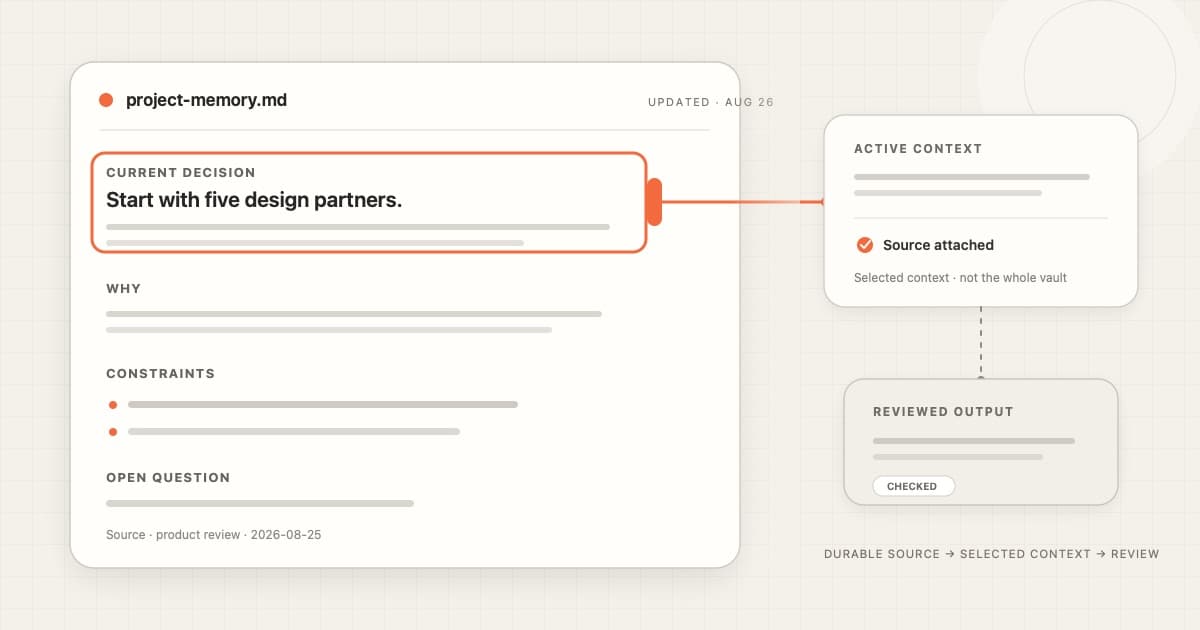
An AI conversation ends. The project does not.
If the useful part of the conversation lives only in chat history, you may have to explain it again next time. A small Markdown note gives the decision somewhere durable to live. It does not give the AI automatic memory. It gives people and tools a readable source they can deliberately bring back.
The short answer
Markdown is useful memory for AI work because it keeps project context in readable, lightly structured text that can survive one conversation.
The useful word is memory, not automatic. A Markdown file becomes active context only when you or a tool finds it and loads the relevant part. Permissions, freshness, retrieval, and review still need their own mechanisms.
| Layer | What it does | What it does not do |
|---|---|---|
| Markdown file | Keeps a durable, readable record | Choose the right fact for this task |
| Search or retrieval | Finds a relevant note or section | Prove the note is current or true |
| Context window | Gives the model text for this request | Persist it after the request ends |
| Permission and review | Controls access and changes | Live inside Markdown syntax |
That separation matters. It keeps a simple file useful without pretending the file is the whole system.
Memory has four layers
People often call all four layers “AI memory.” They are different jobs.
1. The durable record
This is the part that remains after the conversation closes.
A Markdown file can hold a decision, constraint, project state, source, and date. CommonMark defines Markdown as plain text for structured documents. The file stays understandable without a special renderer, even though richer extensions can behave differently between apps. CommonMark specification.
2. Retrieval
The right note has to be found.
That may be a filename, full-text search, a tag, a project folder, or an agent tool. Retrieval should narrow the field. Loading an entire notes folder into every request creates a different problem: irrelevant context, stale facts, and less room for the work at hand.
3. Active context
The model can only work with what enters the current request.
Sometimes that means pasting one section. Sometimes it means attaching a file. Sometimes a connected tool searches the folder and returns a relevant note. The durable record and the active context can be the same text, but they are not the same state.
OpenAI documents AGENTS.md files that Codex deliberately discovers and loads as project guidance. Anthropic documents a similar role for CLAUDE.md, while making an important distinction: these files are context, not enforced configuration. OpenAI source · Anthropic source
4. Authority
Context can guide an answer. It should not silently grant permission.
A note that says “send the update” is still only text. The app or agent needs separate rules for what it can read, change, send, or publish. Review matters most when the outcome leaves the workspace or changes shared state.
This is why a visible source and a visible action boundary are more useful than a vague promise that an assistant “remembers everything.”
Why Markdown helps
Markdown has a modest advantage: it is easy to inspect.
The source remains readable
You can open the file and see what the agent may read.
There is no hidden conversion required for the core text. Headings look like headings. Lists look like lists. A code block remains visually distinct. That does not guarantee a correct answer, but it makes the input easier to audit.
Structure stays lightweight
A useful project note does not need a complex schema.
A few headings can separate the current decision from the history that produced it:
# Launch brief

Updated: 2026-08-26

## Current decision
Start with five design partners.

## Why
We need close feedback before widening access.

## Constraints
- Keep onboarding under ten minutes.
- Do not promise a public date.

## Open questions
- Who owns the invitation list?

## Source
Product review, 2026-08-25.
The note is still readable as plain text. The headings also give a person or retrieval tool clear places to look.
The file can be addressed
A filename and path give the note a stable place in the workflow.
That is useful for people and for tools. It is easier to say “use the current decision in launch-brief.md” than “remember what we discussed sometime last week.”
The path is not enough on its own. Renames, duplicate titles, and moved folders can still break references. A tool may add stable identifiers or an index around the files.
Changes can stay visible
If you already use version control, text changes can be reviewed as diffs. You can see that a date changed, a constraint disappeared, or a decision was replaced. Git documents that text-diff workflow.
Git is optional. A dated edit log or a superseded section may be enough for a small personal workspace. The important part is that old and new claims do not quietly blur together.
A one-note workflow
Start smaller than a knowledge base.
Use one low-stakes project note and make its job obvious.
Step 1: Write the current state
Capture the parts you would otherwise re-explain:
- current decision;
- why it was made;
- constraints;
- open questions;
- source;
- updated date.
Keep raw brainstorming elsewhere. Memory is more useful when the current state is easy to distinguish from abandoned ideas.
If voice is the fastest way to start, use Cue Dictation or type directly into Cue Notes. Clean the note before treating it as a durable source.
Step 2: Retrieve before you load
Ask for the named note or search for the project.
Cue Notes keeps the durable source as local Markdown. Cue Agent can search saved notes and meetings and show sources behind an answer. Start by finding the relevant note and checking that it is current.
A connected agent should not need the whole vault to answer one question.
Step 3: Select the smallest useful section
For a launch-status question, the current decision and constraints may be enough. The brainstorming history may not be.
Small, relevant context is easier to inspect. It also reduces the chance that an old idea competes with the current one. This is a workflow principle, not a guarantee of better model performance.
Step 4: Make the source visible
Ask the assistant to name the note or section it used.
Cue's current Agent page shows answers with visible sources. The MCP page describes an optional connection to compatible agents that the user initiates. These are two ways to connect a durable file to an active request; neither makes every file automatically available.
Step 5: Review the output
Check the answer against the note.
If the decision has changed, update or supersede the source before asking again. Do not patch the answer while leaving the durable note wrong. Otherwise the same stale context returns in the next session.
A simple close to the loop is:
- answer from the selected note;
- show the source;
- flag uncertainty;
- propose any source change;
- let the person approve or reject it.
What Markdown does not solve
A readable file removes some mystery. It does not remove the hard parts.
Stale facts
A perfectly formatted note can still be wrong.
Add an updated date and a source. Mark replaced decisions clearly. For sensitive or time-dependent work, verify the original system before acting.
Retrieval at scale
A folder works until it becomes hard to find the right thing.
Larger collections may need an index, metadata, search ranking, links, or another retrieval layer. Markdown can remain the readable source while a database helps find it. The choice is not always files or database; the two can have different jobs.
Extensions and attachments
The core text may travel while the experience does not.
Wiki links, custom blocks, canvases, embedded files, and app-specific frontmatter can make a note less portable or harder for another tool to interpret. Keep the durable claim understandable without depending on decoration.
Concurrent edits
Two tools can change the same file.
A watcher, version history, merge process, or approval queue can help. None makes simultaneous edits automatically safe. Use one writer at a time for important notes unless the product has a clear conflict model.
Secrets and permissions
Readable does not mean shareable.
Do not put passwords, API keys, private customer data, or unnecessary personal information into a broadly loaded memory file. A local file may still be sent to a cloud model if you choose a connected workflow. Check the storage, retrieval, processing, and action boundaries separately.
Enforcement
Instructions in Markdown guide a model. They do not create a security boundary.
Use actual permissions, sandboxing, approval checks, and product controls for rules that must hold even when the model misunderstands the text.
When Markdown is not enough
Use more than a folder when the job needs:
- strict row-level permissions;
- many simultaneous writers;
- reliable relational queries;
- automatic retention policies;
- strong audit requirements;
- high-volume retrieval with measured ranking quality;
- structured transactions;
- a shared system of record.
Markdown can still be the human-readable edge of that system. It does not have to be the only store.
The honest standard is simple: can you see the source, find the relevant part, tell whether it is current, and control what happens next?
Frequently asked questions
Does Markdown give an AI long-term memory?
Not by itself.
The file can persist across sessions. A person or tool still has to load the relevant content into a later request.
Why not keep everything in chat history?
Chat history is useful for continuity inside one conversation.
A project note is better for the small set of decisions and constraints that should survive beyond it. Copy the durable conclusion, not the whole transcript.
Should I use one large memory file?
Usually not for long.
One short file can work for a small project. As it grows, split stable topics so a person or tool can load only what matters. Keep a small index if the folder becomes hard to navigate.
Is Markdown better than JSON for AI context?
They serve different jobs.
Markdown is pleasant for people to read and edit. JSON is useful when exact fields and machine validation matter. A system may keep narrative context in Markdown and structured state elsewhere.
Does local Markdown stay on my Mac?
The stored file can.
If you attach it to a cloud assistant or use a cloud model, selected content may leave the Mac under that provider's terms. Local storage and model processing are separate choices.
Can an agent safely update the memory file?
Only with a clear write boundary.
The agent should show the proposed change, preserve the source or history when appropriate, and let you review important edits. For high-consequence facts, verify them before saving.
Sources
Accessed October 3, 2026.
- CommonMark specification
- OpenAI: Custom instructions with AGENTS.md
- Anthropic: How Claude remembers your project
- Git diff documentation
- Cue Notes
- Cue Agent
- Cue MCP
Try it with one note
To make that note easier to check, see how to keep AI notes tied to their sources. For the larger knowledge-base pattern, read why Karpathy’s LLM Wiki makes sense for AI agents.
Create one project note in Cue Notes. Add the current decision, why it was made, the date, and one open question. Then ask Cue or a connected agent to use only that note and show you the source behind its answer.